
Visual Screen Scraping
Screen Scraping
Do you need to screen scrape data into your database, spreadsheet or any other application? In just minutes, you can use SeeShell to OCR data from all kinds of screens, terminals and dialog boxes – automatically and without coding.
Extract Anything
SeeShell's screen scraping solution allows you to visually mark the data that you want to extract ("scrape"). You simply draw pink frame(s) around the data that you need. SeeShell then retrieves the data directly from the desktop with high-quality OCR (Optical Character Recognition). The OCR approach works with everything on your screen: Windows app, terminals, RDP sessions, Citrix, VM Ware, Vbox,.. so everthing that displays data can be screen scrapeds.
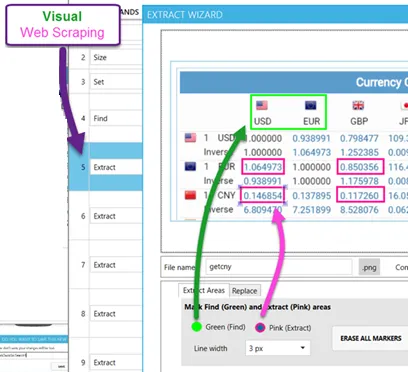
This screenshot shows the Extraction wizard inside the SeeShell Editor. Essentially this is a tiny graphical editor that allows you the draw, move and delete green and pink frames.
Top TopWhy Choose SeeShell for Screen Scraping?
Zero learning curve
SeeShell integrates with every Windows scripting or programming language, so there's no need to learn a new language to work with SeeShell.
You're in full control
SeeShell is an application that you can run on your own machine(s), not a hosted service. You have full control over it and it never expires.
Built-in toolset
SeeShell comes with sample macros, scripts and programs (with complete source code) that you can easily customize for your own needs.
Built-in OCR and PDF data extraction
SeeShell is the only scraping tool with built-in zonal OCR features. Zonal OCR is a type of optical character recognition allows the software to read specific areas or "zones" of a document. So it can extract information even from videos or PDF.
Custom script creation available
Our tech support can help you getting started, and even create the first data extraction scripts for you – at no additional cost.
For more in-depth information on how SeeShell data extraction works technically, visit the web scraping user manual.
Top